
CEF punt adjancency
In "border cases" you might find interesting CEF adjacencies in your CEF adjacency table (displayed with show ip cef adjacency). Most common one is the glean adjacency used for directly connected routes (this adjacency type is a placeholder that indicates the router it should perform the ARP table lookup and send the packet to directly connected neighbor). Discard, Drop, Noroute and Null adjacencies are obvious, the "weird" one is the Punt adjacency, which indicates that the router cannot CEF-switch the packet toward the destination (due to a feature being used that is not yet supported by CEF), thus the packet is punted to the next switching method (fast switching and ultimately process switching).
Reload the router from an interim privilege level
While you wouldn't usually want non-privileged user to reload a Cisco IOS-based router, you might also not appreciate the need to give the network operator level-15 access (which includes configuration privileges) just to reload the box. The solution is the privilege configuration command. To lower the privilege level of the reload command, configure privilege exec level desired-level reload.
Count the logging messages
I haven't figured out why I would need this particular IOS feature (IOS documentation says you can at least get a glimpse of what was happening before the logging buffer wrapped over), but it's such a cool one I simply have to mention it ... starting with release 12.2(8)T and 12.3, IOS can tabulate the occurence of each log message.
Per-Port CEF Load Balancing
In designs with very low number of IP hosts, no per-destination load-sharing algorithm will work adequately. Consider, for example, an extranet design where a large number of IP hosts are NAT-ed to a single IP address which then accesses a single remote server.
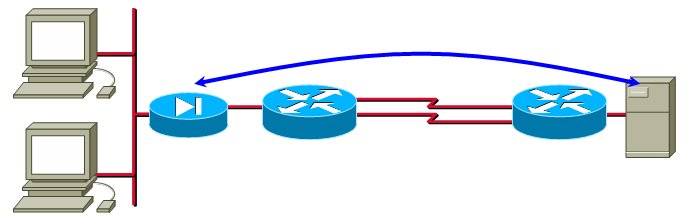
In this design, all the traffic flows between a single pair of IP addresses, making per-destination load-sharing unusable.
Improve the convergence of static routes
Have you ever experienced a long wait between the moment you've configured a static route and its appearance in the IP routing table? The reason might be that Cisco IOS by default adjusts static routes every 60 seconds. IOS release 12.0(29)S (integrated in 12.3(10) and 12.4) fixes this problem with the ip route static adjust-time seconds global configuration command.
Enhanced OSPF Adjacency Logging
The log-adjacency-changes OSPF configuration command was improved with the detail command that logs every step of OSPF adjacency establishment (sample printout below), making it a great troubleshooting tool.
%OSPF-5-ADJCHG: Process 1, Nbr 172.16.0.21 on Serial0/0/0.100 from DOWN to INIT, Received Hello
%OSPF-5-ADJCHG: Process 1, Nbr 172.16.0.21 on Serial0/0/0.100 from INIT to 2WAY, 2-Way Received
%OSPF-5-ADJCHG: Process 1, Nbr 172.16.0.21 on Serial0/0/0.100 from 2WAY to EXSTART, AdjOK?
%OSPF-5-ADJCHG: Process 1, Nbr 172.16.0.21 on Serial0/0/0.100 from EXSTART to EXCHANGE, Negotiation Done
%OSPF-5-ADJCHG: Process 1, Nbr 172.16.0.21 on Serial0/0/0.100 from EXCHANGE to LOADING, Exchange Done
%OSPF-5-ADJCHG: Process 1, Nbr 172.16.0.21 on Serial0/0/0.100 from LOADING to FULL, Loading Done
How do I stop all logging done by the router
Although you probably don't ever want to stop all router's logging activities (at the very minimum you should collect the messages in a memory buffer with the logging buffered command), the global configuration command to do it is no logging on.
Disable console logging
Large amount of logging output (most often produced in a debugging process) sent to a router's console can significantly increase the router's CPU load and even stop the box from forwarding packets (high-end routers with distributed forwarding architecture are obviously an exception, but even they can lose routing adjacencies). The reason is very simple - console interrupt is one of the highest-priority interrupts on the router (otherwise you wouldn't be able to get a response to the BREAK key on a hung box).
Remove timestamps from syslog messages
The ability to replace router uptime with date and time in the logging messages with the service timestamps log datetime command was present in IOS for a long time, but I was always annoyed at timestamps when collecting syslog messages for demonstration purposes. The command to turn them off has also been available "forever", but was too obvious for me to try out ... the no service timestamps log command.
Configuration rollback fails completely with IP SLA
The Configuration Rollback feature (first available in IOS release 12.3(7)T) fails completely when handling configurations containing active IP SLA probes.