
Blog Posts in January 2007
Cisco IOS web server with no enable password
IOS has (yet another) nice "underdocumented" feature - if you don't have an enable password/secret configured on your router, you can access IOS HTTP(S) server (assuming it's enabled with the ip http server command) without any authentication whatsoever. Of course you'd never do that in a production environment, but it's nice to know you can always configure the router from a web browser if needed (see also the discussion on default passwords with Cisco SDM).
Default username on Cisco routers
I get a lot of hits via Google from people searching for a default username on Cisco router. It's ages-old news, but there is no default username. Period. If you have to get access to a router and cannot remember the password(s), the only thing left is the password recovery mechanism ... although even that can be disabled with the no service password-recovery configuration command.
There are, however, a few things you can do if you want to relax the access to your router in a lab environment (never do it in a production network):
Firewalls kill TCP performance when faced with out-of-order packets
In my discussion of per-packet versus per-destination load sharing, I've relied on the "accepted wisdom" that out-of-order TCP packets reduce session performance (as a side note, out-of-order UDP packets are a true performance killer; just try running NFS with out-of-order packets).
Today I've discovered another huge show-stopper: stateful firewalls (read: almost everything in use today) might just drop out-of-order packets, resulting in TCP timeouts and retransmissions (and repeated timeouts will totally wreck the session throughput). Here's how Cisco devices handle this problem:
VTY access-class accepts extended and named access lists
You could limit terminal access to a router with an access-class in line configuration command for a very long time (since, at least, IOS release 10.0). However, the access-class command only accepted standard access-lists, allowing you to restrict access solely based on source IP addresses. In the meantime, this feature quietly got upgraded to support extended access lists. In the IOS release 12.4, the command even accepts (undocumented !) named access lists.
These new features give you the ability to implement interesting policies, for example:
Disable the "more" prompt
If you want to disable the Cisco IOS more ... prompt (for example, when listing router's configuration with the show running command), set the terminal screen length to zero with the terminal length 0 exec-mode command. To change the terminal lenght permanently, use the length lines line configuration command, for example:
line console
 length 0
line vty 0 4
 length 0
Cisco IOS Login Enhancements
Cisco has in IOS release 12.3(4)T (integrated into 12.4) finally introduced features (long available in Unix and Windows) that slow down dictionary attacks on a router. On top of logging of login failures, you can also slow down the login process by delaying the router response after a login failure with the login delay seconds command.
On top of that, the you can configure the router to enter quiet mode after several login failures have been detected in specified timeframe with the login block-for seconds attempts tries within seconds configuration command.
CEF punted packets
The packets that cannot be CEF-switched in a box with CEF switching enabled are punted to the next switching level (fast switching or process switching). The incoming packets can be punted for a number of reasons, for example:
- If the destination is reachable over an interface that cannot use CEF-switching due to a feature not supported by CEF (for example, X.25 link), the packet has to be fast- or process-switched.
These destinations are easily discovered by inspecting the punt adjacencies.
CEF punt adjancency
In "border cases" you might find interesting CEF adjacencies in your CEF adjacency table (displayed with show ip cef adjacency). Most common one is the glean adjacency used for directly connected routes (this adjacency type is a placeholder that indicates the router it should perform the ARP table lookup and send the packet to directly connected neighbor). Discard, Drop, Noroute and Null adjacencies are obvious, the "weird" one is the Punt adjacency, which indicates that the router cannot CEF-switch the packet toward the destination (due to a feature being used that is not yet supported by CEF), thus the packet is punted to the next switching method (fast switching and ultimately process switching).
Reload the router from an interim privilege level
While you wouldn't usually want non-privileged user to reload a Cisco IOS-based router, you might also not appreciate the need to give the network operator level-15 access (which includes configuration privileges) just to reload the box. The solution is the privilege configuration command. To lower the privilege level of the reload command, configure privilege exec level desired-level reload.
Count the logging messages
I haven't figured out why I would need this particular IOS feature (IOS documentation says you can at least get a glimpse of what was happening before the logging buffer wrapped over), but it's such a cool one I simply have to mention it ... starting with release 12.2(8)T and 12.3, IOS can tabulate the occurence of each log message.
Per-Port CEF Load Balancing
In designs with very low number of IP hosts, no per-destination load-sharing algorithm will work adequately. Consider, for example, an extranet design where a large number of IP hosts are NAT-ed to a single IP address which then accesses a single remote server.
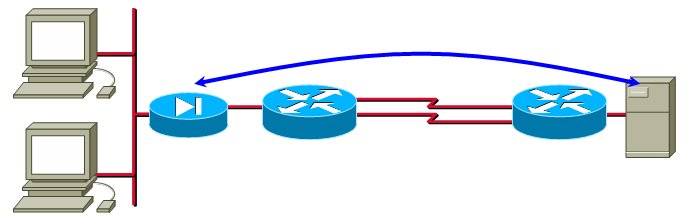
In this design, all the traffic flows between a single pair of IP addresses, making per-destination load-sharing unusable.
Improve the convergence of static routes
Have you ever experienced a long wait between the moment you've configured a static route and its appearance in the IP routing table? The reason might be that Cisco IOS by default adjusts static routes every 60 seconds. IOS release 12.0(29)S (integrated in 12.3(10) and 12.4) fixes this problem with the ip route static adjust-time seconds global configuration command.
Enhanced OSPF Adjacency Logging
The log-adjacency-changes OSPF configuration command was improved with the detail command that logs every step of OSPF adjacency establishment (sample printout below), making it a great troubleshooting tool.
%OSPF-5-ADJCHG: Process 1, Nbr 172.16.0.21 on Serial0/0/0.100 from DOWN to INIT, Received Hello
%OSPF-5-ADJCHG: Process 1, Nbr 172.16.0.21 on Serial0/0/0.100 from INIT to 2WAY, 2-Way Received
%OSPF-5-ADJCHG: Process 1, Nbr 172.16.0.21 on Serial0/0/0.100 from 2WAY to EXSTART, AdjOK?
%OSPF-5-ADJCHG: Process 1, Nbr 172.16.0.21 on Serial0/0/0.100 from EXSTART to EXCHANGE, Negotiation Done
%OSPF-5-ADJCHG: Process 1, Nbr 172.16.0.21 on Serial0/0/0.100 from EXCHANGE to LOADING, Exchange Done
%OSPF-5-ADJCHG: Process 1, Nbr 172.16.0.21 on Serial0/0/0.100 from LOADING to FULL, Loading Done
How do I stop all logging done by the router
Although you probably don't ever want to stop all router's logging activities (at the very minimum you should collect the messages in a memory buffer with the logging buffered command), the global configuration command to do it is no logging on.
Disable console logging
Large amount of logging output (most often produced in a debugging process) sent to a router's console can significantly increase the router's CPU load and even stop the box from forwarding packets (high-end routers with distributed forwarding architecture are obviously an exception, but even they can lose routing adjacencies). The reason is very simple - console interrupt is one of the highest-priority interrupts on the router (otherwise you wouldn't be able to get a response to the BREAK key on a hung box).
Remove timestamps from syslog messages
The ability to replace router uptime with date and time in the logging messages with the service timestamps log datetime command was present in IOS for a long time, but I was always annoyed at timestamps when collecting syslog messages for demonstration purposes. The command to turn them off has also been available "forever", but was too obvious for me to try out ... the no service timestamps log command.