
Blog Posts in December 2006
Configuration rollback fails completely with IP SLA
The Configuration Rollback feature (first available in IOS release 12.3(7)T) fails completely when handling configurations containing active IP SLA probes.
Per-destination or per-packet CEF load sharing?
Cisco Express Forwarding (CEF) can perform per-packet or per-destination (actually source/destination IP address pair) load-sharing with no performance degradation (without CEF, per-packet load-sharing requires process switching).
Even though there is no performance impact on the router, per-packet load sharing will almost always result in out-of-order packets. The packet reordering might degrade TCP throughput in high-speed environments (in low-speed/few-flows scenarios, per-packet load-sharing actually improves the per-flow throughput) or severely impact applications that cannot survive out-of-order packet delivery, such as Fast Sequenced Transport for SNA over IP or voice/video streams.
Configuration Change Logging ignores the configuration downloads
The Configuration Change Notification and Logging feature is supposed to log changes to the router's configuration. While it does a great job of logging commands entered in the router configuration mode, it completely ignores configuration changes due to configuration download (for example, with configure network or copy tftp running-config command).
Which switching path does an IOS feature use
I've got an excellent question recently: Which switching path is used in Zone-based firewalls when a packet is dropped? As usual, IOS documentation was not very helpful (which is understandable as the answer might depend on hardware platform, interface encapsulation, other features configured on the router etc.). However, there is a great tool to use - the show interface stats command.
Fine-Tuning CEF Load Balancing
In environments with a low number of IP hosts you have to fine-tune the CEF load-sharing algorithm to ensure that the traffic is spread between all parallel paths. A typical scenario is a primary-backup data center setup with pairs of replicating servers, as shown in the figure below.
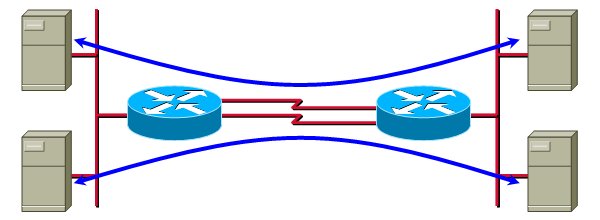
In these cases, you have to try different values of seed parameter of the CEF universal algorithm.
Local username authentication
As I get a lot of hits from Google refering to local login, here's the whole story: Cisco IOS supports local username/password based authentication (almost) forever (it's been there even before the AAA architecture). To change from simple password-based authentication to username+password based on, use login local configuration command on console and/or VTY lines. The local usernames and passwords are defined with the username configuration command.
IOS HTTP client sets Host: field to IP address
Update 2012-08-27: Stefan de Kooter reported the bug had been fixed in IOS release 15.1(4)M.
If you run multiple web sites on a single physical server, it's highly likely that you rely on the ability of HTTP/1.1 clients to specify the Host: field in the HTTP request to indicate which web site they're trying to access.
Cisco IOS always inserts the web server's IP address (not the hostname) in the Host: field of the HTTP request, regardless of whether you enter IP address or hostname in the URL part of an IOS command that supports HTTP (for example, copy or more command) ... and regardless of whether the hostname is locally configured with the ip host command or resolved by an external DNS server specified in the ip name-server command.
Log terminal access to your router
In a previous post, I've shown how you can log the changes in interactive user's privilege level. With the Cisco IOS Login Enhancements (introduced in IOS release 12.3(4)T, integrated in 12.4), you can also log all login successes and failures, even when using local user database (a similar functionality was previously achievable only when using central TACACS+ or RADIUS server).
The configuration commands to enable terminal access logging are login on-success log and login on-failure log. You can also specify that you want send SNMP traps in these circumstances (with the trap option) or that you only want to log every Nth attempt with the every n option.