
Category: DNS
Yellow journalism at work: Previously Unknown DNS Attacks
When I’ve stumbled across the headline Porn site feud spawns new DNS attack on NetworkWorld’s web site, the urge to read the article was simply irresistible. The article starts with the following paragraph (emphasis mine):
A scrap between two pornographic Web sites turned nasty when one figured out how to take down the other by exploiting a previously unknown quirk in the Internet's DNS.
The link in the paragraph points to another article documenting a completely different DNS attack. The next paragraph contradicts the first one (emphasis yet again mine):
The attack is known as DNS Amplification. It has been used sporadically since December, but it started getting talked about last month when ISPrime, a small New York ISP, started getting hit hard with what's known as a distributed denial of service (DDoS) attack.
Decent DNS, DHCP and HTTP server on an ISR router
Readers of my blog have probably noticed that I’m occasionally documenting the shortcomings of DNS and DHCP servers built into Cisco IOS (I will not even mention the HTTP server, this one gets constantly degraded). On the other hand, although you could centralize all these services, the centralization makes the branch offices completely dependent on the availability of WAN uplinks; without a working uplink, a branch office stops completely.
DNS view-groups don't work on subinterfaces
Working on an implementation of a split DNS design, I encountered an interesting bug in Cisco IOS: the ip dns view-group command works only on interfaces, but not on subinterfaces. As it’s a pure IP feature, there obviously no reason why it shouldn’t work on anything that has an IP address; obviously someone forgot to insert the correct entry in the parser tables.
DNS views work with EEM
If you've tried to use DNS view/view-list configuration commands in EEM applets, the applets failed as the EEM did not recognize DNS-specific configuration prompts (you could work around this problem with the prompt option of the action cli command). This bug was fixed in 12.4(15)T5, now you can configure DNS views from EEM.
… updated on Tuesday, January 5, 2021 07:47 UTC
Using IP Prefixes, AS Numbers and Domain Names in Examples
Keep in mind: Use private IP addresses, AS numbers and domain names in all technical documentation you're producing (unless, of course, you're describing an actual network). If you're forced to use public addresses or AS numbers (for example, to illustrate how the neighbor remote-private-as command works), you should clearly state that they are imaginary.
You can safely use:
Setup DNS server in your lab
If you do a lot of telnetting in your lab, you could set up an internal DNS server to be able to use router names instead of IP addresses.
Configure DNS Servers Through IPCP
After I've fixed the default routing in my home office, I've stumbled across another problem: the two ISPs I'm using for my primary and backup link have DNS servers that reply solely to the DNS requests sent from their own IP address range:
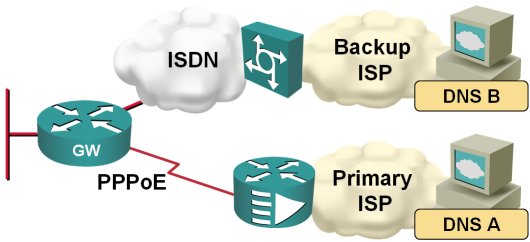
When the traffic is switched from the primary to the backup ISP, I therefore also need to switch the DNS servers. Fortunately, this is quite easy to do on a router; you just need to configure ppp ipcp dns request on the dialer interface and the router starts asking for the DNS server address as part of the IPCP negotiation.
The DNS configuration "challenges"
With the introduction of DNS views in IOS release 12.4(9)T, a number of additional DNS-related configuration commands were introduced. As IOS still supports all the older configuration commands (and the DHCP-acquired DNS servers), the results are not as obvious as one would hope. The IOS documentation is pretty explicit (a nice surprise :), but I still had a bit of a headache figuring it all out, so you might be in the same position.
Unbundle DNS settings from DHCP client
In one of my previous posts I've been writing about the problems I had when the DHCP client on Cisco IOS was messing up the DNS name-servers I've configured manually with the ip name-server configuration command. As is quite usual in Cisco IOS, there's one more know to turn to fix this - the Configurable DHCP Client feature introduced in IOS release 12.3(8)T.
To stop the router's DHCP client from overwriting the static name-server settings, use the no ip dhcp client request dns-nameserver interface configuration command (you can also exclude a few other DHCP options).
DNS resolver in Cisco IOS is auto-configured with parameters from a DHCP reply
If you're using DHCP to get IP interface addresses on your router (using the ip address dhcp interface configuration command), the router will also inherit the DNS resolver settings included in the DHCP reply. Makes sense, but the implementation is "a bit" unexpected: if you configure the DNS name servers manually with the ip name-server address-list command, the ones matching the values in the DHCP reply packet are not included in the running configuration and thus not saved to NVRAM. Even worse, the statically-configured name-servers overwritten by a DHCP reply are lost if the DHCP-configured interface goes down.
To avoid total confusion, you thus have these options:
- Do not use DHCP to acquire IP interface addresses
- Make sure the DHCP server does not send DNS-related parameters (a bit hard if you're using DHCP with your ISP)
- Rely exclusively on DHCP to provide your router with the DNS name server addresses