
ARP with EVPN Asymmetric IRB
TL&DR: With the right nerd knob settings, it all works
In a previous blog post, I described the ARP issues you’ll encounter when using centralized routing (on a spine switch) between two EVPN MAC-VRF instances (a fancy name for a VLAN encapsulated in VXLAN or MPLS).
That blog post established a baseline that will help us unravel the ARP behavior in a more realistic scenario: asymmetric Integrated Routing and Bridging (IRB). That’s a mouthful, but it’s really quite a simple concept; the following diagram explains the asymmetric forwarding behavior:
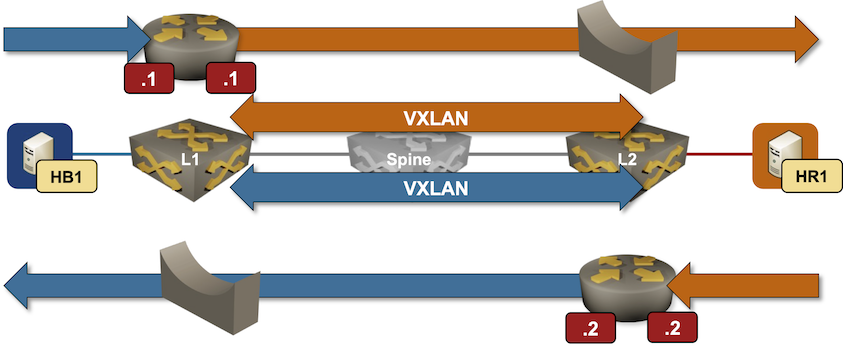
Packet forwarding in an EVPN asymmetric IRB design
Hands-On Introduction to SR-MPLS
The second demo1 I did during the Segment Routing workshop @ ITNOG10 illustrated how easy it is to set up and explore a small SR-MPLS network with netlab. The lab topology described a small three-router network (you need three routers to see “true” labels besides the penultimate-hop popping ones):

MUST READ: The Future of Everything is Lies, I Guess
Kyle Kingsbury published a long (10-part) article about his frustrations with AI, aptly named The Future of Everything is Lies, I Guess.
Regardless of where you are on the skeptic-to-fanboy spectrum, I would highly recommend you read it, even if you believe you’ll disagree with everything he wrote.
Reorganized ipSpace.net Segment Routing Resources
I created nine sample SR-MPLS topologies for the ITNOG 10 SR-MPLS workshop, and of course, we ran out of time. I plan to cover those topologies and resulting printouts in a series of blog posts; to prepare for those, I cleaned up and reorganized the Segment Routing blog category, which is now split into two:
Hope you’ll find them useful! Also, if you know of other non-vendor Segment Routing resources, please leave a comment, email me, or submit a pull request.
On ARP and MAC Aging Timers
Naveen Kumar Devaraj mentioned an interesting fact in his EVPN-related comment:
The EOS default ARP timeout is 4 hours, and MAC aging is 5 minutes.
Arista is not the only platform using these default values; did you ever wonder where they came from?
Hmmm: Cloudflare's Automatic Return Routing
A while ago, I found the How Automatic Return Routing solves IP overlap article on Cloudflare’s blog. They evidently have a technology that addresses a pain point well worth solving (access to shared resources from clients using overlapping address ranges). I just hate how they’re selling it. Go read the article first; I’ll wait.
OK, here’s what bothers me: the “VRFs and NAT are bad” claims, while they use the same technology in disguise.
ARP Issues in EVPN Centralized Routing Design
TL&DR: SIP of Networking Was an Understatement 🤦♂️
Adding IRB to a EVPN MAC-VRFs (the fancy way of saying stretched VLANs) seems like a no-brainer:
- Add IP addresses to VLAN interfaces
- Optionally add a shared anycast gateway
- Declare “Mission Accomplished” (and try to ignore the inevitable phone call at 2 AM on a Sunday night)
Making that work in a multi-vendor environment is even more fun1, as I sadly discovered when creating the EVPN lab exercises or trying to figure out why some EVPN implementations were failing netlab EVPN integration tests.
SwiNOG 41: It Was Nice to Be Back
Last week’s SwiNOG was (as expected) great fun at a phenomenal location, starting with the first slide of the first presentation: “6 Stages of Network De-sh*tification”. I particularly loved the “talk less, chat more” schedule. The longer breaks gave us plenty of time to catch up with old friends and discuss interesting, sometimes completely unexpected, topics. For example, I learned that SIP MESSAGE is used to carry SMS messages these days.
As much as I loved chatting with fellow networking engineers, I also found these presentations highly interesting:
Generate Partial Device Configurations with netlab
At ITNOG 10, I’ve seen something that I haven’t seen in a very long time: a mini-Interop-style physical lab using a dozen devices from different vendors. The network core was a leaf-and-spine fabric with off-path BGP route reflectors and numerous other devices attached to it.
I’ve configured a few networks in the past, so I know it must have been a beast to configure all those devices by hand (and fix all the IP addressing errors), but then a thought struck me: unless one wants to practice configuring IP addresses, it might be a good idea to use netlab to generate the IP addressing plan and partial device configurations.
On Generating EVPN MAC/IP Routes
Naveen Kumar Devaraj was reading my Integrated Routing and Bridging (IRB) with EVPN MAC-VRF Instances lab exercise and spotted this detail:
Arista EOS originates MAC-IP routes with and without IP addresses, effectively doubling the size of the EVPN BGP table
He kindly wrote a LinkedIn comment explaining that behavior: