
Install a Static Route When an IP Address Is NOT Reachable
One of my readers recently asked an interesting question: “How do you install a static route when an IP address is not reachable?”
Without going into the design reasons that prompted the question, you can actually track when IP SLA measurement fails with an obscure configuration syntax of the track objects that tracks when another track object fails.
Warm reload does not change the config register
Contrary to what the regular reload does, the warm reload does not change the configuration register value (obviously that's done by ROMMON, which is not involved in the warm reload process). If you just did a password recovery and changed the configuration register back to a normal value, you'd thus be unpleasantly surprised when the NVRAM would be ignored (yet again) after a warm reload (I stumbled across this as I was trying a new IOS release with the reload warm file URL command).
DHCP-based static routes
If you have configured your router as a DHCP client, you can use the default router option received in a DHCP reply as the next-hop for a static route. For example:
ip route 10.0.0.0 255.0.0.0 dhcp
You could use this functionality in scenarios where your core network uses DHCP (for example, in metropolitan networks using layer-2 Ethernet transport from an ISP), but your router needs a different default route.
You can also use this feature to change the administrative distance of the DHCP-based default route (or you could use the ip dhcp-client default-router distance value configuration command that one of the readers described in a comment to a previous DHCP-related post).
Reload a Router from Tcl Script
In his comment, Michal has asked about the ability to execute IOS commands with prompts from Tcl shell. I haven't found a generic solution yet, but you can reload a router from a Tcl script. First you have to define an EEM applet that reloads the router and can be triggered from command-line interface:
event manager applet forceReload
 event none
 action 1.0 reload
Now you can use the exec "event manager run forceReload" Tcl command in your Tcl script to run the applet (and reload the router).
Import DHCP options from an upstream DHCP server
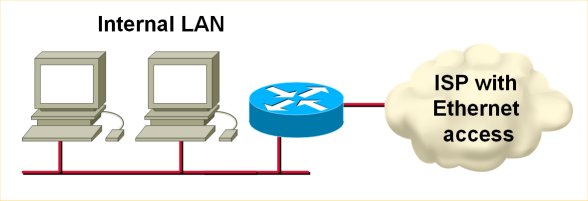
If your router gets its IP address from an upstream DHCP server, it can automatically import the other DHCP options (DNS server, WINS server, domain prefix etc.) into its DHCP pools. For example, if you use a router to connect to a cable or MAN Ethernet ISP (see the following figure), you can use the DHCP option import to minimize your router configuration (and make it fail safe from any changes in the ISP network).
OSPF Graceful Shutdown
Reloading a core router in a high-availability network is always a tricky proposition. Even if you tweak the routing protocol hello timers (or use fast L2 mechanisms to detect next-hop loss), it still takes a few seconds for the routing protocols to converge. For example, when using OSPF, the adjacent routers have to detect the neighbor loss, change their router LSAs, flood them (LSA flooding is rate-limited), the changed LSAs have to be propagated across the whole area and all routers in the area have to run SPF (which is also rate-limited).
It would be much better if you could gracefully take a router offline by increasing the OSPF cost on all its interfaces, thus forcing an OSPF SPF run while the router is still capable of forwarding the traffic (resulting in no packet loss).
Default DHCP client-id
If you configure a Cisco router as a DHCP client, you'll notice that it uses weird client-id in its DHCP requests (assuming you care about client IDs on the DHCP server). Instead of using the interface MAC address as the client ID (as most workstations do), the client ID is the string 'cisco-dotted.mac.ascii-ifname' where the dotted.mac.ascii is the interface MAC address in ascii and the ifname is the short interface name.
Obviously, if your ISP checks your MAC address (and at least most cable operators do), you might have a problem. To make the router behave like a workstation, use the ip address dhcp client-id interface-name configuration command. The new client ID will be the MAC address of the specified interface (which can be different from the interface you're configuring).
Example: Tcl script with command-line parameters
In a comment to the “Execute multiple commands at once” post, Michal has asked for a complete Tcl-shell-with-parameter example. Here's a short script that shuts down the interface and displays its status:
Re-enable debugging without EEM
In his comment to my post about re-enabling debugging after router reload, Mike pointed out an interesting IOS feature: you can execute the do command from a configuration file, not just from the user interface. To make his tip even more useful, you can store the do command(s) in an external file on a TFTP server, not in the startup configuration (which would have to be edited manually). With the boot host URL configuration command you'd then ensure that these commands are executed after the router reload.
Sample configuration: periodic upload of router configuration
Pete Vickers sent me a very interesting configuration sample:
To get an IOS device to upload it’s configuration periodically to an external FTP server:
ip ftp source-interface loopback 0
ip ftp username ftp_username
ip ftp password ftp_password
file prompt quiet
!
kron policy-list backup
 cli copy running-config ftp://10.20.30.40
!
kron occurrence daily-backup at 0:30 recurring
 policy-list backup
The beauty of this example is that you can use it on platforms that don't support Embedded Event Manager (which has a very similar cron functionality) as the kron commands were introduced in 12.2T and 12.3 IOS releases.