
ARP with Anycast Gateways in EVPN Asymmetric IRB
TL&DR: The deeper we dig, the curiouser it gets.
In previous blog posts, I described the ARP issues in EVPN environments, starting with centralized routing, and then asymmetric IRB with unicast (per-leaf-switch) first-hop gateways. Of course, no self-respecting vendor would tell you to do that; anycast gateways are all the rage these days.
As always, anycast gateways could mean different things, depending on which vendor documentation you read ;)
- Active-active VRRP (one device is the active VRRP gateway, but all devices listen to the VRRP MAC address).
- Shared MAC+IP address beside device-specific unicast MAC and IP addresses.
- Shared MAC+IP address with no PE-specific IP address.
The only difference between (1) and (2) is the mechanism used to derive the shared MAC/IP address, either a control-plane protocol (VRRP) or static configuration.
The main difference between (1+2) and (3) is the number of IP addresses on each PE device’s VLAN interfaces. In the first two cases, the PE device has a unique IP address and can communicate with the directly-connected devices. For example, it could run a routing protocol with them. In the last case, the shared IP address is primarily usable as a target for ARP queries (sometimes even pings don’t work).
This blog post describes the second scenario:
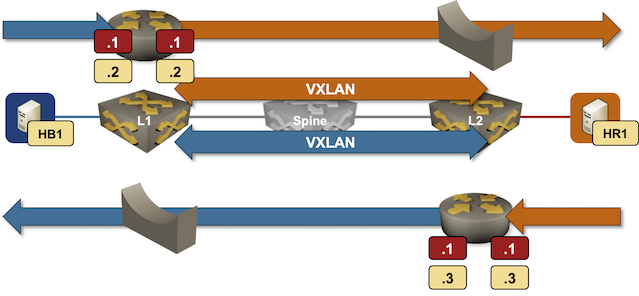
Packet forwarding in an EVPN asymmetric IRB design with anycast gateways
- Every PE device has an IP address (yellow box in the diagram) in every VLAN (EVPN MAC-VRF instance)
- PE devices have a shared MAC and IP address (red box in the diagram) in every VLAN.
- Every host uses the shared VLAN anycast gateway as its first-hop gateway.
In our small topology, HB1 uses Blue.11 as the default gateway, and HR1 uses Red.1.
ARP Resolution on the Sender Side
Here’s how HB1 sends the first packet to HR1:
- HB1 sends an ARP request for its default gateway (Blue.1). When L1 receives the ARP request, it replies with the shared MAC address.
- HB1 sends the packet for HR1 to L1.
The sends the ARP request part is already funky. The HB1 ARP request is sent as a broadcast packet, but I couldn’t see it forwarded to the VXLAN segment. It looks like Arista EOS intercepts ARP broadcasts for local IP addresses (which makes sense, but is not what one might expect).
Some implementations (for example, Arista EOS) send gratuitous ARPs for the shared MAC/IP address every few seconds (Arista EOS default seems to be 30 seconds) to ensure the attached hosts use the correct MAC address. What happens after HB1 sends the ARP request is even more interesting:
ARP Resolution on the Ingress Switch
HB1 sent the packet destined for HR1 to L1. Now, L1 has to do its job, and the first step is another address resolution – it needs to know the MAC address of HR1.
If we’re lucky, L1 populated its ARP cache from the EVPN MAC+IP routes and can just forward the packet to HR1. Otherwise, it has to send an answerable ARP request over VXLAN.
Some implementations mess up that part and send the ARP request over VXLAN from anycast MAC/IP address. There’s just a tiny glitch there – the response never comes back (remember that the switch closest to the host catches all the traffic sent to the shared anycast MAC address).
The simplest way to make anycast gateways work in this scenario is thus to configure unicast IP addresses on PE devices. The PE devices MUST then use the unicast IP addresses for all control-plane communication (including ARP requests).
Final twist: the ARP response from the destination host is sent to the ingress PE device’s MAC address. If the ingress PE device does not advertise its MAC address in an EVPN route, the ARP response will be flooded to all PE devices participating in the same MAC VRF instance (see the asymmetric IRB blog post for more details). Not necessarily a disaster, but definitely something to keep in mind.
Try It Out
The lab topology I used in this blog post is in the netlab-examples GitHub repository. If you want to try it out:
- Set up your lab environment (you can use free GitHub Codespaces)
- Change directory to
EVPN/asymmetric-anycast - Execute
netlab up - Execute
netlab config --limit pe add_anycastto configure the anycast gateways.
-
First IP address in the Blue prefix ↩︎
Hi Ivan,
Another great article!
Regarding the first observation:
“The sends the ARP request part is already funky. The HB1 ARP request is sent as a broadcast packet, but I couldn’t see it forwarded to the VXLAN segment. It looks like Arista EOS intercepts ARP broadcasts for local IP addresses (which makes sense, but is not what one might expect).”
This behavior is by design and is the result of EVPN ARP suppression (enabled on EOS by default with IRB). There are two scenarios:
L1 has the ARP binding for HR1 (learned from a Type-2 MAC+IP route): L1 proxy-replies on behalf of HR1 and suppresses forwarding the ARP request over the tunnel. This is standard EVPN ARP suppression behavior.
L1 has no ARP binding for HR1: L1 forwards the ARP request over the tunnel via head-end replication and the request reaches HR1. HR1's ARP reply, unicast to vMAC, is trapped (punted to CPU) by L2. L2 then originates a Type-2 MAC+IP route that propagates to L1. So the original ARP request does traverse the data plane, but the resolution is ultimately serviced in the control plane.
Regarding the second observation:
"Some implementations mess up that part and send the ARP request over VXLAN from anycast MAC/IP address. There's just a tiny glitch there - the response never comes back..."
The behavior on EOS depends on two factors:
Whether EVPN is the control plane for VxLAN
Whether the gateway uses VARP (ip virtual-router address) or Anycast Gateway (ip address virtual) — options 2 and 3 in your article
In the pre-EVPN era (static HER "control plane"), ARP requests were serviced entirely in the data plane. In the scenario you describe, when the ARP request from HB1 arrives at L1, L1 head-end replicates it to remote VTEPs based on the flood list. The behavior then diverges:
With VARP (ip virtual-router address):
The VxLAN-encapsulated ARP frame has:
Outer SIP: L1's VTEP Loopback address (unique per device or MLAG pair if applicable)
Inner SMAC: L1's bridge MAC (not vMAC)
On L2, L1's bridge MAC is learned behind L1's VTEP. The ARP reply from HR1 is unicast to L1's bridge MAC and forwarded to L1 using regular VxLAN unicast semantics. This works cleanly because the bridge MAC is unique per device.
With Anycast Gateway (ip address virtual):
The VxLAN-encapsulated ARP frame has:
Outer SIP: L1's secondary Loopback address (also known as vVTEP or Virtual VTEP IP in EOS documentation — happy to elaborate on this if there's interest)
Inner SMAC: vMAC (shared across all anycast gateways)
There is no data-plane MAC learning on L2 for vMAC, since L2 is also a routed VTEP with an SVI and owns the same vMAC. HR1's ARP reply, unicast to vMAC, is handled by a re-HER mechanism on L2's wherein it replicates the reply to all other anycast gateway peers (including L1), ensuring the originating VTEP receives the response. During this re-HER operation, the inner SMAC is rewritten from the host's MAC to L2's bridge MAC to prevent incorrect MAC learning on the receiving VTEPs.
As we can infer from this, handling ARP with VxLAN and anycast gateways is inherently tricky. Moving these mechanics to the EVPN control plane elegantly solves much of that underlying complexity. Go EVPN!!
~ Naveen
Thanks a million for all the details! Ivan